AI has changed software development, but many teams face a paradox: despite using the latest AI assistants, their code quality continues to decline. The instinctive response is to blame the AI tools. However, it’s often the case that they lack the proper infrastructure for AI. Without guardrails, context, and workflows designed for AI-augmented development, the most sophisticated tools can’t cope. The context you're failing to provide is where the gap typically lies. We'll show you how we develop AI infrastructure at COAX in this article. You'll find out:
Why the only aspect of AI development that you can truly control is context infrastructure (and why that matters).
How COAX created a central repository that transforms generic AI assistants into development partners prepared for production.
The three-step process used structured prompts and validation checkpoints to eliminate 95% of AI-generated code issues.
Useful templates for creating tasks, automating code reviews, and customizable domain-specific guidelines.
Let's begin with the unsettling truth: you won't accelerate without adequate AI infrastructure.
Why does AI infrastructure matter so much now?
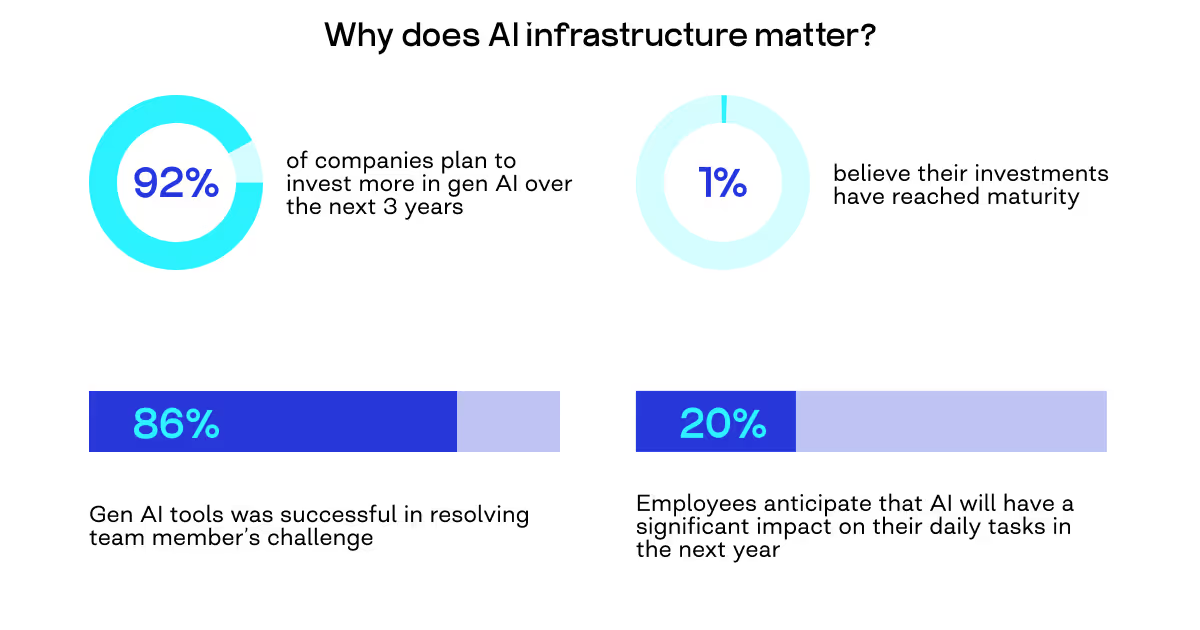
The market for AI coding assistants is about to reach a tipping point. According to McKinsey's analysis of over 400 machine learning use cases, 92% of businesses invest in AI efforts, but only 1% believe the technology is advanced enough for production use. What do we have as a result? A gap between confidence and investment is a daily reality.
"I was very skeptical at first," admits Orest Falchuk, Head of Engineering at COAX. "There were moments when I couldn't even look at all these prompts anymore. But this is our reality now. You can't avoid using AI, so you need to learn how to use it correctly to get the best result."
Since 2020, when GPT-1 appeared as a rough beta, software development has changed. We are seeing industry adaptation in early 2025, where development driven by AI becomes essential, and we will most likely see more in 2026 and beyond. Even though tools like Cursor and the Modern Context Protocol were only introduced in 2024, they are already changing it all.
The unsettling reality is that AI coding tools won't solve all of your development issues. You’ll likely get new ones without the proper AI setup.
The pain points that cause AI to fail you
Over the years of experience with AI deployment and training, our engineers have faced, documented, and prepared for the key pain points of working with AI for software development.
The workflow learning curve.
There’s this first impression that writing the code is quicker than creating the ideal prompt to elicit the correct response. Orest describes this tension clearly: "AI is great for boilerplate, but developers must still manually handle the most complex, high-value, architectural work."
According to Van Wyk's research, the difficulty increases when tools are unable to comprehend proprietary or internal libraries. Industry analysts refer to switching between different AI tools or using one that doesn't have context regarding your particular codebase as a "fragmented experience." Explaining your architecture takes up more time than actually building it.
This is similar to the difficulties in orchestrating data pipelines, where systems need to coordinate across various sources without a centralized context, according to Muvva's research.
Quality and security concerns.
Vulnerabilities brought in by blind faith in AI recommendations are hard to find during fast reviews. The issue isn't that AI makes mistakes - rather, it's that those frequently seem reasonable. "The AI as an autocomplete, or an AI agent that generally writes code, they probably have the entire internet, or rather, the entire dataset on which the model was trained. Including, let's be honest, not the highest-quality resources."
The outcome? Code that functions but falls short of your requirements. Ironically, there’s a human factor here, too - model creators' presumptions and biases are also risks in a variety of industries. Debugging time shifts from resolving glaring problems to pursuing subtle, illogical AI outputs that pass preliminary testing but malfunction under production load.
Inconsistent outcomes.
Inconsistent outcomes from similar prompts are arguably the most annoying challenge. AI-generated code frequently deviates from your preferred style, necessitating manual reworking to adhere to programming conventions. Code churn and ongoing maintenance expenses result from this.
The frustration compounds when you realize the solution exists - it's just sitting in a different part of your codebase that the AI didn't consider. "All the sum of these factors," Falchuk reflects, "is a pain point for simply taking and switching to trusting AI in how code is written in general."
So, where can you actually make a difference to avoid these challenges or bring them to a minimum?
The three components of AI infrastructure: controllable and uncontrollable
Let’s face it: some of the components of your AI setup are under your control, and others are not. So, which is which?
Component 1. Tools (The interface layer)
Teams frequently place the wrong blame when they have trouble with AI assistants. They say, "This tool doesn't understand our codebase," or "That model keeps making mistakes." However, as COAX found, neither the models nor the tools are the issue. Cursor, Antigravity, Codex, and other AI and machine learning providers are just the interfaces that reside within your browser or IDE, displaying AI-generated code and converting your intentions into prompts. With tools, you have little control. Although there are well-liked alternatives (COAX, for example, standardized on GitHub Copilot as their main tool), they are essentially external products.
"In principle, everyone understands this," Orest notes. "Theoretically, tools can be developed, but why do this if there are already many similar tools and plugins that work in IDEs?" For example, Cursor went beyond autocomplete, showing what's possible when AI deeply integrates into the development environment. Yet even this VS Code fork, which has changed developer expectations, has a limitation: it's an external tool with its own opinions and constraints. Developers must adapt their workflows to fit this paradigm rather than customize the AI to match their specific codebase, standards, and processes.
Component 2. Models (The execution engines)
These are the AI engines that actually carry out tasks, help you create data pipelines, and perform various tasks - Gemini 3 Pro, Claude 4.5 Sonnet, GPT-5/5.1, and numerous others. Their capabilities are growing at an exponential rate. While open-source models exist and companies can fine-tune their own, this approach doesn't scale. You can fine-tune your own models, train them on your own dataset, but "while we raise one model, three more will come out from giants such as Google, Microsoft, OpenAI, and so on.
Because different models are better at different tasks, selecting the "right" model becomes a moving target. Claude 4.5 Sonnet, Gemini 3 Pro, and GPT 5.1 are used by COAX developers, but each has unique advantages and disadvantages: "all of them are, to a certain extent, like personalities," according to Orest.
Models, like tools, are largely beyond your control. You can choose which ones to use and switch between them based on task requirements, but you can't dictate their capabilities or roadmaps. This is the second component where you're fundamentally a consumer, not a creator.
Component 3. Context (Your advantage)
Everything changes in context. This contains details about the software development process used by your company, including naming conventions, security procedures, testing standards, coding practices, style guides, and patterns.
"Context is what we can really influence," Orest emphasizes. "We can create, change, experiment, and regardless of the first two components, context has, in my opinion, the greatest influence and priority at the moment, plus the fact that we can control it."
Through context, you can configure the following areas:
Architectural patterns outline how your team organizes application development, which frameworks the code will contain, and any custom conventions.
Consistent naming conventions for variables, functions, classes, and files, to avoid confusion for customers and developers when working with your code.
Security rules that will apply to AI-based code generation so that AI-generated code adheres to your organisation's security approach.
Testing standards define the types of tests needed to test the code (unit, integration, etc.), how the tests should be written, and which methodologies will be used by your development team.
Code style preferences specify formatting and indenting standards and stylistic choices that will keep your projects consistent.
Depending on the quality and specificity of their context, two businesses using the same models and tools will produce very different outcomes.
For this reason, COAX made significant investments in creating what they refer to as the "COAX AI Infrastructure": a central repository that serves as a digital knowledge base dedicated to coding practices.
Building the context infrastructure: The COAX AI repository
It's one thing to realize that context is the variable under control. It is a different matter entirely to actually create a comprehensive context infrastructure that turns generic AI assistants into development partners tailored to individual companies.
The solution offered by COAX is a central hub that has all the context data required for AI tools to produce code that is ready for production. It's a meticulously structured system that was created through a great deal of trial and error, especially for AI consumption.
GitHub Copilot is native to the hierarchical structure of the COAX AI repository. A.github directory contains all context files, which are arranged into distinct subdirectories.
The structure foundation: copilot-instructions.md
copilot-instructions.md contains the foundation for all projects. In particular, you can refer to the GitHub documentation on adding repository custom instructions. All AI interactions begin with instructions from this file.
The most important coding philosophies, such as following Rails Convention or using 2 Space Indentation. The file also contains priority hierarchy information between project code and default code style to ensure AI will respect that existing patterns, even those in old codebases, take precedence over the defaults.
Framework-specific guidelines to define and maintain conventions for controllers, models, async jobs, and database design.
Syntax references so the AI must read its corresponding configuration file for each project to be familiar with the project-specific linting rules.
"These instructions were specifically developed through trial and error. And this is absolutely not the final version; it will continue to develop," Orest emphasizes.
At the end of this foundational file, COAX defines the standard architecture that it uses when developing client projects, including the types of class definitions COAX uses. This foundation helps create a strong understanding of all practices for AI and COAX developers.
Area-specific instructions
The .github/instructions/ directory contains files that provide deeper context for specific domains:
database.instructions.md defines best practices for database design and normalization. These are general best practices: what naming to use, the defined business terminology, how to properly follow the four normal forms, etc.
test.instructions.md was developed through particularly intensive iteration. "Testing instructions, which we also worked on at home, literally almost every line had a certain basis that it generated itself when asked, but more than half of all these instructions were written iteratively," Orest recalls.
By using a domain-specific approach, our team (and other teams, respectively) can capture specialized knowledge relevant to their industry, resulting in an increasingly complex context as the repository develops.
Orest says, "Now in 95% of cases it does exactly what we need." Instead of relying on the AI to deduce specific expectations from examples, the precision comes from directly encoding them into the context.
Project-specific overrides
A crucial issue is resolved by repo-specific.instructions.md: How to manage project-specific deviations without damaging your general context files.
"If you have certain project specifics, and it doesn't quite match the general instructions, then please make all these changes precisely in this repo-specific instructions file and don't edit the general files. Why? Because when there comes, say, some next iteration and updates come out for these contexts, so that it doesn't overwrite these changes, but so that you simply keep them in your own special file," Orest advises.
Because of this separation, a common antipattern is easily avoided: teams modifying shared context files to account for the peculiarities of one project, then losing those modifications when the shared files are updated. The override mechanism lets the core context change on its own while maintaining project-specific rules.
Personalized prompts for reusable processes
The repository contains a.github/prompts/ directory for reusable workflow templates in addition to static instructions. These are organized prompts made for particular, recurring tasks.
The task generation prompt
The task.prompt.md file demonstrates the power of structured workflows. Instead of having the AI immediately start coding, this prompt creates a validation checkpoint.
"This is a prompt for generating tasks. For instance, as a user, I want to have a button. This is a very general description for the task, but I, as a user, can give such a user story, I can copy it into the agent, or rather, specifically link this prompt to the user story context, and it will structure and describe it for me according to this template before I simply ask it to do it," Orest explains.
An analysis of the user story will be performed to identify key requirements from that story.
After completing the analysis, the prompt will provide:
A detailed task structure with a clearly defined scope.
Acceptance criteria defining successful completion of the task.
An implementation plan detailing how the changes will be made.
Before executing any code generated from the structured task, users must validate the structured task.
"It’s important - otherwise, it might not guess at all. If it just starts working right away, it might create 10 files, and it will all be off target. So I want to first read through the description, look at whether it understood me well, and whether I explained it well. Did it describe the acceptance criteria? What's the implementation plan? What will it execute and in what order?"
Validation stops developers from wasting effort attempting to satisfy misunderstood user requirements and also allows the developer to change direction based on the user's refinements to the structured task before generating code.
Right now, COAX has one of the main prompt templates available; however, because of COAX's structure, infinite templates can be created.
AI agents as specialized workers
The .github/agents/ directory contains pre-configured AI agents designed for specific responsibilities. These agents combine context awareness with specialized instructions to perform focused tasks autonomously.
Technology-specific reviewer agents
Rather than relying on general AI tools, our team built technology-specific reviewers: ruby-reviewer.md, react-reviewer.md, react-native-reviewer.md, python-reviewer.md, and others. Each reviewer encodes the specific patterns, anti-patterns, and best practices for its domain.
For instance, a "ruby.reviewer.md" automates and creates automation by using a specialized context. While a human code reviewer might use inconsistent criteria or miss nuances because they become fatigued, the AI agent employs a consistent and rigorous analysis to every pull request.
Orest describes: "As the co-pilot agent, the code reviewer agent has access to these contexts and conducts the code review as directed, according to the instructions that you created for it."
The agent uses a structured matrix to apply assessments in a uniform manner:
Documentation. Are new features documented? Do README files reflect current functionality?
Linter compliance. Does the code pass all linting rules defined in project configuration?
Tests. Are new features covered by tests? Do tests follow the organization's testing standards?
Libraries. Are dependencies up-to-date? Are deprecated libraries flagged?
Code structure. Does the implementation follow architectural patterns defined in context files?
Database design. Are migrations properly structured? Do schema changes follow normalization rules?
The agent generates a technical analysis file using a "stoplight" format (indicators that provide an at-a-glance assessment of code quality across these dimensions.
The practical impact is significant. "This thing is now also being armed by competence leads, who will use this during project reviews," allowing senior engineers to quickly assess code quality across multiple projects without manually reviewing every file.
Running agents in the background
One of the most powerful features is that agents can work asynchronously while the team focuses on other tasks. For example, Orest triggers the review agent and lets it run in the background: "It will take about 15-20 minutes, depending on the size of the project and the magnitude," while the team continues with other work.
Such an execution means code quality analysis happens continuously without blocking development.
AI infrastructure development workflow
The first step of developing your right AI background is to define exactly what you want to achieve. With 15 years of experience in travel and hospitality, COAX has learned some lessons in AI hospitality use cases and applying them to other industries. For instance, Orest applies it to a straightforward user story, the kind that appears in sprint planning sessions across the industry:
"As a user, I want to view the number of vulnerabilities that have been fixed and the total number in a bar chart for the last 30 days on the Repository Vulnerability page."
Traditional development would involve manually writing controller logic, creating a new chart component, writing transformation logic, and integrating everything. Instead, we can lead it through such steps:
Step 1. Context configuration.
We set up the context repository in the development environment so that the AI has access to it. This is essential, as without the context synced, the AI will revert to generic patterns trained on data. With the context repository in place, the AI learns about COAX's architectural patterns, testing requirements, and coding styles.
Step 2. Invoking the custom prompt.
Next, we don’t simply type our request directly into the AI chat. Instead, we use a preconfigured context prompt (.github/prompts/task.prompt.md) designed for task preparation. This prompt, as described in the previous chapter, guides the AI to create a comprehensive task description and implementation plan. We invoke this prompt with the entire user story, giving the AI full context of what is needed in the build. Importantly, it does not immediately result in code generation.
Step 3: AI analysis, clarification, and task description creation.
Instead of blindly executing, the AI analyzes the request and asks clarifying questions. Before the previous step, it would have just followed the prompt and immediately given some response. Here, the AI identifies ambiguities:
Which existing chart components should serve as templates?
What data source should be queried?
Should the visualization match existing design patterns?
Are there specific styling requirements?
AI reviews the project structure, using contextual understanding to see which files contain reusable code. By analyzing the file structure through the context repository, the AI finds existing chart implementations, sets the analytics service that supplies the data, locates the controller managing the vulnerability page, and pinpoints the view partial where we'll render the chart.
After this analysis, the AI generates a comprehensive task description file containing:
Overview. Description demonstrating the AI's understanding of the project's goals
Chart display criteria. Specific data and visualization requirements
Implementation plan. Detailed step-by-step instructions for required modifications
Testing and documentation steps. Ensuring compliance with development standards
This validation checkpoint ensures alignment between what's requested and what will be built before any code is written. A human reviews this task description to confirm the AI has understood the requirements correctly.
Step 4: Implementation and iterative testing.
With approval given, the AI begins writing code. It follows an iterative process that mirrors how experienced developers work:
Write the feature code (service method, controller action, view partial)
Write corresponding tests as defined in test.instructions.md
Run the tests to verify functionality
Read the test output if tests fail
Fix issues and repeat until tests pass
This iterative, test-driven approach catches errors early and ensures code quality without manual intervention.
What is created as a result?
In the staging app, the feature produces results that show both functionality and a design that complies with expected outcomes. The chart produced is exactly as expected and positioned based on where it’s supposed to be, demonstrating consistency between functional requirements and design principles.
Beyond the structured workflow described above, Artificial Intelligence infrastructure enables even simpler interactions for straightforward changes. "I asked for a very simple data nugget to be added to a page," Orest shares, "and I requested it directly from the AI agent on GitHub.com." Since this was a non-commercial project and the change was minimal, he merged it without pulling the code locally or running tests. "When I deployed it to staging, it just worked."
Subsequently, we see how advances in technology and AI have enabled developers to create and deploy code with increased confidence because of improved access to the level of context that enables confidence in the ability of AI to generate high-quality code.
AI infrastructure - final nuances
In the demonstration of how we develop the AI setup at COAX, we witnessed the remarkable outcomes of taking control of the context to tune the model and drive the interface (the key components) to produce the outputs you need.
However, as our AI infrastructure engineers have proven multiple times, no matter what, in the end, the developer bears responsibility for the code they deliver. This accountability principle is non-negotiable. Having the right AI context and workflows hub amplifies developer productivity, but it doesn't eliminate the need for experienced judgment.
"This thing helps focus on more strategic, architectural, global approaches and decisions. And this thing can execute the task," Orest explains. "The developer generally outlines what they want, conditionally writes pseudocode, and the AI agent executes the implementation."
The leverage comes from automation of implementation details, not replacement of architectural thinking. Contrary to a widespread belief, this approach probably won't scale to a large number of different projects. But for accelerating delivery on one or two projects, it’s very useful. We're still limited by human context, as a developer can only hold so much system knowledge in their head at once. The AI doesn't change that fundamental constraint.
Finally, there's an important recognition: building infrastructure that saves time requires an upfront investment in fast-paced development environments. But as COAX discovered, the alternative - repeatedly fixing inconsistent AI output or manually refactoring code to meet standards - costs far more in aggregate.
FAQ
What's the cost comparison between building a custom context vs. using off-the-shelf AI tools?
Off-the-shelf tools like Cursor or GitHub Copilot are excellent starting points with minimal setup costs. However, without a custom context, you'll spend significant time manually fixing AI-generated code that doesn't match your standards. Network externalities are produced by unified platforms, where participation in the ecosystem increases value, according to Katz & Shapiro. Most teams should start with existing tools and gradually build custom context as patterns emerge.
How do I get started with AI context infrastructure if my team has never used it before?
To begin, use established frameworks to evaluate the maturity of your current infrastructure, as stated by Gartner. Start small with the basics. Create a simple .github/copilot-instructions.md file that documents your team's core coding standards. Begin with one project, gather feedback from your developers, and iterate. The key is making the context accessible to your AI tools, so they stop generating generic code that doesn't match your standards.
How do you handle project-specific requirements without breaking your shared context?
Use a repo-specific.instructions.md file for each project. If you have certain project specifics, and it doesn't quite match the general instructions, then make all these changes precisely in this repo-specific instructions file and don't edit the general files. This way, when you update your core context files, you won't overwrite project-specific rules. It's a simple separation that prevents the common mistake of modifying shared files for one project's quirks, then losing those changes during the next update.
Should we create AI reviewer agents for every technology we use?
Yes, if you work with those technologies regularly. COAX built separate reviewers because each technology has distinct patterns and anti-patterns. The code reviewer agent has access to these contexts and conducts the code review as directed, according to the instructions that you created for it. These agents catch technology-specific issues that generic reviewers miss: N+1 queries in Ruby, improper hook usage in React, or non-idiomatic Python patterns. The consistency alone makes them worthwhile.
How do you prevent AI from generating code that works but doesn't match your standards?
Encode your standards directly into context files rather than hoping AI will deduce them from examples. This includes architectural patterns, security rules, testing requirements, and code style preferences. The precision comes from being explicit. When AI has access to these instructions, it generates code that already follows your conventions. Combine this with structured prompts that create validation checkpoints before code generation, and you catch misunderstandings before wasting time on implementation.
How does COAX implement secure and efficient AI infrastructure?
Through ISO/IEC 27001:2022 certification, COAX employs multi-layered security, guaranteeing thorough security management, risk assessment, and ongoing monitoring. Our ISO 9001 certification attests to the quality of their infrastructure operations. But beyond certifications, the practical approach matters: security rules are encoded directly into context files so AI-generated code adheres to security standards from the start. The structured workflow ensures code quality without sacrificing development speed.
































































_.avif)

_.avif)



We are interested in your opinion